 Steve Yegge
bd - Beads Issue Tracker 🔗
Give your coding agent a memory upgrade
⚠️ Alpha Status: This project is in active development. The core features work well, but expect API changes before 1.0. Use for development/internal projects first.
✅ Critical Fix (v0.9.6) - Testing Phase
Fixed auto-import bug (bd-228) that silently overwrote local changes. Collision detection is now enabled. Field testing in progress - please report any issues with multi-machine workflows or agent swarms.
Beads is a lightweight memory system for coding agents, using a graph-based issue tracker. Four kinds of dependencies work to chain your issues together like beads, making them easy for agents to follow for long distances, and reliably perform complex task streams in the right order.
Drop Beads into any project where you're using a coding agent, and you'll enjoy an instant upgrade in organization, focus, and your agent's ability to handle long-horizon tasks over multiple compaction sessions. Your agents will use issue tracking with proper epics, rather than creating a swamp of rotten half-implemented markdown plans.
Instant start:
curl -fsSL https://raw.githubusercontent.com/steveyegge/beads/main/install.sh | bash
Then tell your coding agent to start using the bd tool instead of markdown for all new work, somewhere in your AGENTS.md or CLAUDE.md. That's all there is to it!
You don't use Beads directly as a human. Your coding agent will file and manage issues on your behalf. They'll file things they notice automatically, and you can ask them at any time to add or update issues for you.
Beads gives agents unprecedented long-term planning capability, solving their amnesia when dealing with complex nested plans. They can trivially query the ready work, orient themselves, and land on their feet as soon as they boot up.
Agents using Beads will no longer silently pass over problems they notice due to lack of context space -- instead, they will automatically file issues for newly-discovered work as they go. No more lost work, ever.
Beads issues are backed by git, but through a clever design it manages to act like a managed, centrally hosted SQL database shared by all of the agents working on a project (repo), even across machines.
Beads even improves work auditability. The issue tracker has a sophisticated audit trail, which agents can use to reconstruct complex operations that may have spanned multiple sessions.
Agents report that they enjoy working with Beads, and they will use it spontaneously for both recording new work and reasoning about your project in novel ways. Whether you are a human or an AI, Beads lets you have more fun and less stress with agentic coding.
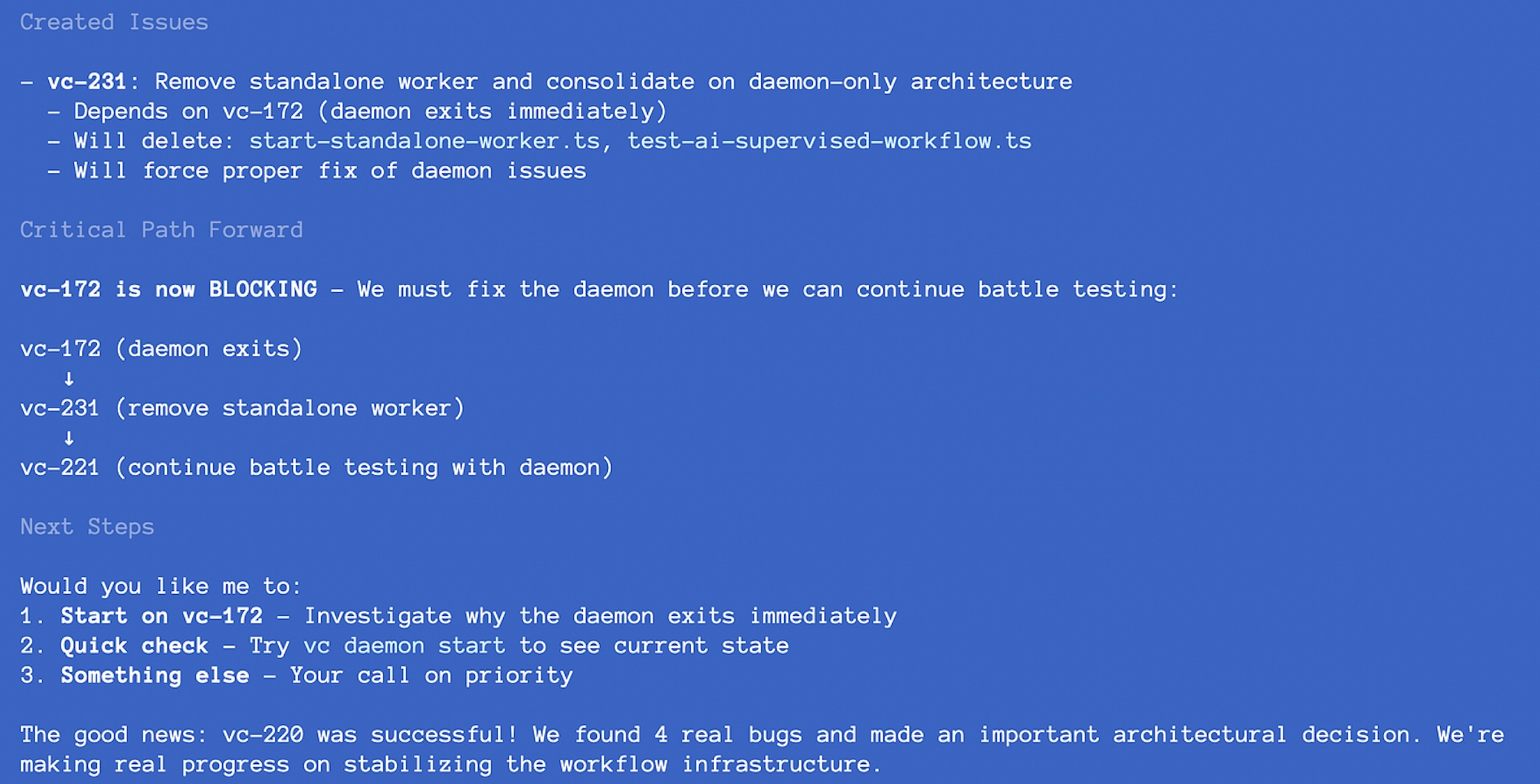
Features
- ✨ Zero setup -
bd initcreates project-local database (and your agent will do it) - 🔗 Dependency tracking - Four dependency types (blocks, related, parent-child, discovered-from)
- 📋 Ready work detection - Automatically finds issues with no open blockers
- 🤖 Agent-friendly -
--jsonflags for programmatic integration - 📦 Git-versioned - JSONL records stored in git, synced across machines
- 🌍 Distributed by design - Agents on multiple machines share one logical database via git
- 🏗️ Extensible - Add your own tables to the SQLite database
- 🔍 Multi-project isolation - Each project gets its own database, auto-discovered by directory
- 🌲 Dependency trees - Visualize full dependency graphs
- 🎨 Beautiful CLI - Colored output for humans, JSON for bots
- 💾 Full audit trail - Every change is logged
- ⚡ High performance - Batch operations for bulk imports (1000 issues in ~950ms)
- 🗜️ Memory decay - Semantic compaction gracefully reduces old closed issues
Installation
Homebrew (macOS/Linux)
brew tap steveyegge/beads
brew install bd
Why Homebrew?
- ✅ Simple one-command install
- ✅ Automatic updates via
brew upgrade - ✅ No need to install Go
- ✅ Handles PATH setup automatically
Quick Install Script (All Platforms)
curl -fsSL https://raw.githubusercontent.com/steveyegge/beads/main/install.sh | bash
The installer will:
- Detect your platform (macOS/Linux, amd64/arm64)
- Install via
go installif Go is available - Fall back to building from source if needed
- Guide you through PATH setup if necessary
Manual Install
# Using go install (requires Go 1.23+)
go install github.com/steveyegge/beads/cmd/bd@latest

# Or build from source
git clone https://github.com/steveyegge/beads
cd beads
go build -o bd ./cmd/bd
sudo mv bd /usr/local/bin/  # or anywhere in your PATH
Arch Linux
# Install from AUR
yay -S beads-git
# or
paru -S beads-git
Thanks to @v4rgas for maintaining the AUR package!
Claude Code Plugin
For Claude Code users, the beads plugin provides slash commands and MCP tools.
Prerequisites:
- First, install the bd CLI (see Quick Install Script above)
- Then install the plugin:
# In Claude Code
/plugin marketplace add steveyegge/beads
/plugin install beads
# Restart Claude Code
The plugin includes:
- Slash commands:
/bd-ready,/bd-create,/bd-show,/bd-update,/bd-close, etc. - Full MCP server with all bd tools
- Task agent for autonomous execution
See PLUGIN.md for complete plugin documentation.
MCP Server (For Sourcegraph Amp, Claude Desktop, and other MCP clients)
If you're using an MCP-compatible tool other than Claude Code, you can install the beads MCP server:
# Using uv (recommended)
uv tool install beads-mcp

# Or using pip
pip install beads-mcp
Then add to your MCP client configuration. For Claude Desktop, add to ~/Library/Application Support/Claude/claude_desktop_config.json (macOS):
{
  "mcpServers": {
    "beads": {
      "command": "beads-mcp"
    }
  }
}
For other MCP clients, refer to their documentation for how to configure MCP servers.
What you get:
- Full bd functionality exposed via MCP protocol
- Tools for creating, updating, listing, and closing issues
- Ready work detection and dependency management
- All without requiring Bash commands
See integrations/beads-mcp/README.md for detailed MCP server documentation.
Windows 11
For Windows you must build from source. Assumes git, go-lang and mingw-64 installed and in path.
git clone https://github.com/steveyegge/beads
cd beads
$env:CGO_ENABLED=1
go build -o bd.exe ./cmd/bd
mv bd.exe $env:USERPROFILE/.local/bin/ # or anywhere in your PATH
Tested with mingw64 from https://github.com/niXman/mingw-builds-binaries
- version:
1.5.20 - architecture:
64 bit - thread model:
posix - C runtime:
ucrt
Quick Start
For Humans
Beads is designed for AI coding agents to use on your behalf. As a human, you typically just:
# 1. Initialize beads in your project
bd init

# 2. Add a note to your agent instructions (CLAUDE.md, AGENTS.md, etc.)
echo "We track work in Beads instead of Markdown. Run \`bd quickstart\` to see how." >> CLAUDE.md

# 3. Let agents handle the rest!
Most tasks will be created and managed by agents during conversations. You can check on things with:
bd list                  # See what's being tracked
bd show <issue-id>       # Review a specific issue
bd ready                 # See what's ready to work on
bd dep tree <issue-id>   # Visualize dependencies
For AI Agents
Run the interactive guide to learn the full workflow:
bd quickstart
Quick reference for agent workflows:
# Find ready work
bd ready --json | jq '.[0]'

# Create issues during work
bd create "Discovered bug" -t bug -p 0 --json

# Link discovered work back to parent
bd dep add <new-id> <parent-id> --type discovered-from

# Update status
bd update <issue-id> --status in_progress --json

# Complete work
bd close <issue-id> --reason "Implemented" --json
The Magic: Distributed Database via Git
Here's the crazy part: bd acts like a centralized database, but it's actually distributed via git.
When you install bd on any machine with your project repo, you get:
- ✅ Full query capabilities (dependencies, ready work, etc.)
- ✅ Fast local operations (<100ms via SQLite)
- ✅ Shared state across all machines (via git)
- ✅ No server, no daemon, no configuration
- ✅ AI-assisted merge conflict resolution
How it works:
- Each machine has a local SQLite cache (
.beads/*.db) - gitignored - Source of truth is JSONL (
.beads/issues.jsonl) - committed to git - Auto-export syncs SQLite → JSONL after CRUD operations (5-second debounce)
- Auto-import syncs JSONL → SQLite when JSONL is newer (e.g., after
git pull) - Git handles distribution; AI handles merge conflicts
The result: Agents on your laptop, your desktop, and your coworker's machine all query and update what feels like a single shared database, but it's really just git doing what git does best - syncing text files across machines. No manual export/import needed!
No PostgreSQL instance. No MySQL server. No hosted service. Just install bd, clone the repo, and you're connected to the "database."
Usage
Creating Issues
bd create "Fix bug" -d "Description" -p 1 -t bug
bd create "Add feature" --description "Long description" --priority 2 --type feature
bd create "Task" -l "backend,urgent" --assignee alice

# Explicit ID (useful for parallel workers to avoid conflicts)
bd create "Worker task" --id worker1-100 -p 1

# Get JSON output for programmatic use
bd create "Fix bug" -d "Description" --json

# Create multiple issues from a markdown file
bd create -f feature-plan.md
Options:
-f, --file- Create multiple issues from markdown file-d, --description- Issue description-p, --priority- Priority (0-4, 0=highest)-t, --type- Type (bug|feature|task|epic|chore)-a, --assignee- Assign to user-l, --labels- Comma-separated labels--id- Explicit issue ID (e.g.,worker1-100for ID space partitioning)--json- Output in JSON format
Creating Issues from Markdown
Draft multiple issues in a markdown file with bd create -f file.md. Format: ## Issue Title creates new issue, optional sections: ### Priority, ### Type, ### Description, ### Assignee, ### Labels, ### Dependencies. Defaults: Priority=2, Type=task
Viewing Issues
bd show bd-1              # Show full details
bd list                   # List all issues
bd list --status open     # Filter by status
bd list --priority 1      # Filter by priority
bd list --assignee alice  # Filter by assignee

# JSON output for agents
bd list --json
bd show bd-1 --json
Updating Issues
bd update bd-1 --status in_progress
bd update bd-1 --priority 2
bd update bd-1 --assignee bob
bd close bd-1 --reason "Completed"
bd close bd-1 bd-2 bd-3   # Close multiple

# JSON output
bd update bd-1 --status in_progress --json
bd close bd-1 --json
Dependencies
# Add dependency (bd-2 depends on bd-1)
bd dep add bd-2 bd-1
bd dep add bd-3 bd-1 --type blocks

# Remove dependency
bd dep remove bd-2 bd-1

# Show dependency tree
bd dep tree bd-2

# Detect cycles
bd dep cycles
Dependency Types
- blocks: Hard blocker (default) - issue cannot start until blocker is resolved
- related: Soft relationship - issues are connected but not blocking
- parent-child: Hierarchical relationship (child depends on parent)
- Correct:
bd dep add bd-task bd-epic --type parent-child(task → epic) - Wrong:
bd dep add bd-epic bd-task --type parent-child(reversed!)
- Correct:
- discovered-from: Issue discovered during work on another issue
Cycle Prevention
Beads maintains a DAG and prevents cycles across all dependency types. Cycles break ready work detection and tree traversals. Attempting to add a cycle-creating dependency returns an error
Finding Work
# Show ready work (no blockers)
bd ready
bd ready --limit 20
bd ready --priority 1
bd ready --assignee alice

# Show blocked issues
bd blocked

# Statistics
bd stats

# JSON output for agents
bd ready --json
Compaction (Memory Decay)
Beads uses AI to compress old closed issues, keeping databases lightweight as they age. This is agentic memory decay - your database naturally forgets fine-grained details while preserving essential context agents need.
bd compact --dry-run --all  # Preview candidates
bd compact --stats          # Show statistics
bd compact --all            # Compact eligible issues (30+ days closed)
bd compact --tier 2 --all   # Ultra-compress (90+ days, rarely referenced)
Uses Claude Haiku for semantic summarization. Tier 1 (30+ days): 70-80% reduction. Tier 2 (90+ days, low references): 90-95% reduction. Requires ANTHROPIC_API_KEY. Cost: ~$1 per 1,000 issues.
Eligibility: Must be closed with no open dependents. Tier 2 requires low reference frequency (<5 commits or <3 issues in last 90 days).
Permanent: Original content is discarded. Recover old versions from git history if needed.
Automation:
# Monthly cron
0 0 1 * * bd compact --all && git add .beads && git commit -m "Monthly compaction"
Database Discovery
bd automatically discovers your database in this order:
--dbflag:bd --db /path/to/db.db create "Issue"$BEADS_DBenvironment variable:export BEADS_DB=/path/to/db.db.beads/*.dbin current directory or ancestors (walks up like git)~/.beads/default.dbas fallback
This means you can:
- Initialize per-project databases with
bd init - Work from any subdirectory (bd finds the database automatically)
- Override for testing or multiple projects
Example:
# Initialize in project root
cd ~/myproject
bd init --prefix myapp

# Work from any subdirectory
cd ~/myproject/src/components
bd create "Fix navbar bug"  # Uses ~/myproject/.beads/myapp.db

# Override for a different project
bd --db ~/otherproject/.beads/other.db list
Dependency Model
Beads has four types of dependencies:
- blocks - Hard blocker (affects ready work calculation)
- related - Soft relationship (just for context)
- parent-child - Epic/subtask hierarchy
- discovered-from - Tracks issues discovered while working on another issue
Only blocks dependencies affect the ready work queue.
Hierarchical Blocking
Important: Blocking propagates through parent-child hierarchies. When a parent (epic) is blocked, all of its children are automatically blocked, even if they have no direct blockers.
This transitive blocking behavior ensures that subtasks don't show up as ready work when their parent epic is blocked:
# Create an epic and a child task
bd create "Epic: User Authentication" -t epic -p 1
bd create "Task: Add login form" -t task -p 1
bd dep add bd-2 bd-1 --type parent-child  # bd-2 is child of bd-1

# Block the epic
bd create "Design authentication system" -t task -p 0
bd dep add bd-1 bd-3 --type blocks  # bd-1 blocked by bd-3

# Now both bd-1 (epic) AND bd-2 (child task) are blocked
bd ready  # Neither will show up
bd blocked  # Shows both bd-1 and bd-2 as blocked
Blocking propagation rules:
blocks+parent-childtogether create transitive blocking (up to 50 levels deep)- Children of blocked parents are automatically blocked
- Grandchildren, great-grandchildren, etc. are also blocked recursively
relatedanddiscovered-fromdo NOT propagate blocking- Only direct
blocksdependencies and inherited parent blocking affect ready work
This design ensures that work on child tasks doesn't begin until the parent epic's blockers are resolved, maintaining logical work order in complex hierarchies.
Dependency Type Usage
-
blocks: Use when issue X cannot start until issue Y is completed
bd dep add bd-5 bd-3 --type blocks # bd-5 blocked by bd-3 -
related: Use for issues that are connected but don't block each other
bd dep add bd-10 bd-8 --type related # bd-10 related to bd-8 -
parent-child: Use for epic/subtask hierarchies
bd dep add bd-15 bd-12 --type parent-child # bd-15 is child of epic bd-12 -
discovered-from: Use when you discover new work while working on an issue
# While working on bd-20, you discover a bug
# Old way (two commands):
bd create "Fix edge case bug" -t bug -p 1
bd dep add bd-21 bd-20 --type discovered-from  # bd-21 discovered from bd-20

# New way (single command with --deps):
bd create "Fix edge case bug" -t bug -p 1 --deps discovered-from:bd-20
The discovered-from type is particularly useful for AI-supervised workflows, where the AI can automatically create issues for discovered work and link them back to the parent task.
AI Agent Integration
All commands support --json for programmatic use. Typical agent workflow: bd ready --json → bd update --status in_progress → bd create (discovered work) → bd close
Ready Work Algorithm
Issue is "ready" if status is open and it has no open blocks dependencies.
Issue Lifecycle
open → in_progress → closed (or blocked if has open blockers)
Architecture
beads/
├── cmd/bd/              # CLI entry point
│   ├── main.go          # Core commands (create, list, show, update, close)
│   ├── init.go          # Project initialization
│   ├── quickstart.go    # Interactive guide
│   └── ...
├── internal/
│   ├── types/           # Core data types (Issue, Dependency, etc.)
│   └── storage/         # Storage interface
│       └── sqlite/      # SQLite implementation
└── EXTENDING.md         # Database extension guide
Extending bd
Applications can extend bd's SQLite database with their own tables. See EXTENDING.md for the full guide.
Quick example:
-- Add your own tables to .beads/myapp.db
CREATE TABLE myapp_executions (
    id INTEGER PRIMARY KEY,
    issue_id TEXT NOT NULL,
    status TEXT NOT NULL,
    started_at DATETIME,
    FOREIGN KEY (issue_id) REFERENCES issues(id)
);

-- Query across layers
SELECT i.*, e.status as execution_status
FROM issues i
LEFT JOIN myapp_executions e ON i.id = e.issue_id
WHERE i.status = 'in_progress';
This pattern enables powerful integrations while keeping bd simple and focused.
Comparison to Other Tools
| Feature | bd | Taskwarrior | GitHub Issues | Jira | Linear |
|---|---|---|---|---|---|
| Zero setup | ✅ | ✅ | ❌ | ❌ | ❌ |
| Dependency tracking | ✅ | ✅ | ⚠️ | ✅ | ✅ |
| Ready work detection | ✅ | ⚠️ | ❌ | ❌ | ❌ |
| Agent-friendly (JSON) | ✅ | ⚠️ | ⚠️ | ⚠️ | ⚠️ |
| Distributed via git | ✅ | ⚠️ | ❌ | ❌ | ❌ |
| Works offline | ✅ | ✅ | ❌ | ❌ | ❌ |
| AI-resolvable conflicts | ✅ | ❌ | ❌ | ❌ | ❌ |
| Extensible database | ✅ | ❌ | ❌ | ❌ | ❌ |
| No server required | ✅ | ✅ | ❌ | ❌ | ❌ |
| Built for AI agents | ✅ | ❌ | ❌ | ❌ | ❌ |
vs. Taskwarrior: Taskwarrior is great for personal task management, but bd is designed specifically for AI agents. bd has explicit dependency types (discovered-from), JSON-first API design, and JSONL storage optimized for git merging. Taskwarrior's sync server requires setup; bd uses git automatically.
Why bd?
bd is designed for AI agents, not humans. Traditional trackers (Jira, GitHub) require web UIs. bd provides --json on all commands, explicit dependency types, and bd ready for unblocked work detection. In agent workflows, issues are memory - preventing agents from forgetting tasks during long sessions
Architecture: JSONL + SQLite
JSONL (.beads/issues.jsonl) is source of truth, committed to git. SQLite (.beads/*.db) is ephemeral cache for fast queries, gitignored. Auto-export after CRUD (5s debounce), auto-import after git pull. No manual sync needed
Export/Import (JSONL Format)
bd can export and import issues as JSON Lines (one JSON object per line). This is perfect for git workflows and data portability.
Export Issues
# Export all issues to stdout
bd export --format=jsonl

# Export to file
bd export --format=jsonl -o issues.jsonl

# Export filtered issues
bd export --format=jsonl --status=open -o open-issues.jsonl
Issues are exported sorted by ID for consistent git diffs.
Import Issues
# Import from stdin
cat issues.jsonl | bd import

# Import from file
bd import -i issues.jsonl

# Skip existing issues (only create new ones)
bd import -i issues.jsonl --skip-existing
Import behavior:
- Existing issues (same ID) are updated with new values
- New issues are created
- All imports are atomic (all or nothing)
Handling ID Collisions
When importing issues, bd detects three types of situations:
- Exact matches - Same ID, same content (idempotent, no action needed)
- New issues - ID doesn't exist in database yet
- Collisions - Same ID but different content (requires resolution)
Collision detection:
# Preview collisions without making changes
bd import -i issues.jsonl --dry-run

# Output shows:
# === Collision Detection Report ===
# Exact matches (idempotent): 5
# New issues: 3
# COLLISIONS DETECTED: 2
#
# Colliding issues:
#   bd-10: Fix authentication bug
#     Conflicting fields: [title, priority, status]
#   bd-15: Add dashboard widget
#     Conflicting fields: [description, assignee]
Resolution strategies:
Option 1: Automatic remapping (recommended for branch merges)
# Automatically resolve collisions by renumbering incoming issues
bd import -i issues.jsonl --resolve-collisions

# bd will:
# 1. Keep existing issues unchanged
# 2. Assign new IDs to colliding incoming issues (bd-25, bd-26, etc.)
# 3. Update ALL text references and dependencies to use new IDs
# 4. Report the remapping:
#
# === Remapping Report ===
# Issues remapped: 2
#
# Remappings (sorted by reference count):
#   bd-10 → bd-25 (refs: 3)
#   bd-15 → bd-26 (refs: 7)
#
# All text and dependency references have been updated.
Option 2: Manual resolution
# 1. Check for collisions first
bd import -i branch-issues.jsonl --dry-run

# 2. Edit JSONL to resolve manually:
#    - Rename IDs in the JSONL file
#    - Or merge content into existing issues
#    - Or skip colliding issues

# 3. Import after manual fixes
bd import -i branch-issues.jsonl
The collision resolution algorithm:
When using --resolve-collisions, bd intelligently remaps colliding issues to minimize updates:
- Detects collisions - Compares ID and content (title, description, status, priority, etc.)
- Scores references - Counts how many times each ID is referenced in:
- Text fields (description, design, notes, acceptance criteria)
- Dependency records (both as source and target)
- Renumbers by score - Issues with fewer references are remapped first
- Updates all references - Uses word-boundary regex to replace old IDs:
- Text fields: "See bd-10 for details" → "See bd-25 for details"
- Dependencies: bd-5 → bd-10 becomes bd-5 → bd-25
- Handles edge cases: Distinguishes bd-10 from bd-100, bd-1000, etc.
Branch merge workflow:
This is particularly useful when merging branches where both sides created issues with the same IDs:
# On main branch: bd-1 through bd-20 exist
git checkout main
bd export -o .beads/issues.jsonl

# On feature branch: Also has bd-1 through bd-20 (diverged)
git checkout feature-branch
bd export -o .beads/issues.jsonl

# Merge branches
git checkout main
git merge feature-branch
# Git shows conflict in .beads/issues.jsonl

# Resolve the conflict in Git (keep both sides for different issues, etc.)
# Then import with collision resolution:
bd import -i .beads/issues.jsonl --resolve-collisions

# Result: Issues from feature-branch get new IDs (bd-21+)
# All cross-references are automatically updated
Important notes:
- Collisions are safe by default - import fails unless you use
--resolve-collisions - Use
--dry-runto preview changes before applying - The algorithm preserves the existing database (existing issues are never renumbered)
- All text mentions and dependency links are updated automatically
- Word-boundary matching prevents false replacements (bd-10 won't match bd-100)
JSONL Format
Each line is a complete JSON issue object:
{"id":"bd-1","title":"Fix login bug","status":"open","priority":1,"issue_type":"bug","created_at":"2025-10-12T10:00:00Z","updated_at":"2025-10-12T10:00:00Z"}
{"id":"bd-2","title":"Add dark mode","status":"in_progress","priority":2,"issue_type":"feature","created_at":"2025-10-12T11:00:00Z","updated_at":"2025-10-12T12:00:00Z"}
Git Workflow
Automatic sync by default! bd now automatically syncs between SQLite and JSONL:
- Auto-export: After CRUD operations, changes flush to JSONL after 5 seconds of inactivity
- Auto-import: When JSONL is newer than DB (e.g., after
git pull), next bd command imports automatically
Setup
Add to .gitignore:
.beads/*.db
.beads/*.db-*
Add to git:
.beads/issues.jsonl
Workflow
Manual Workflow
# Create/update issues - they auto-export after 5 seconds
bd create "Fix bug" -p 1
bd update bd-42 --status in_progress

# Commit (JSONL is already up-to-date)
git add .
git commit -m "Update issues"
git push

# Pull and use - auto-imports if JSONL is newer
git pull
bd ready  # Automatically imports first, then shows ready work
Automatic Sync with bd sync
For multi-device workflows, use bd sync to automate the entire sync process:
# Make your changes
bd create "Fix auth bug" -p 1
bd update bd-42 --status in_progress

# Sync everything in one command
bd sync -m "Update issues"

# This does:
# 1. Exports pending changes to JSONL
# 2. Commits to git
# 3. Pulls from remote (auto-resolves collisions)
# 4. Imports updated JSONL
# 5. Pushes to remote
Options:
bd sync                           # Auto-generated commit message
bd sync -m "Custom message"       # Custom commit message
bd sync --dry-run                 # Preview without changes
bd sync --no-pull                 # Skip pulling from remote
bd sync --no-push                 # Commit but don't push
The bd sync command automatically resolves ID collisions using the same logic as bd import --resolve-collisions, making it safe for concurrent updates from multiple devices.
Background Sync with bd daemon
For continuous automatic syncing, run the bd daemon in the background:
# Start daemon with auto-commit and auto-push
bd daemon --auto-commit --auto-push

# Check daemon status
bd daemon --status

# Stop daemon
bd daemon --stop
The daemon will:
- Poll for changes at configurable intervals (default: 5 minutes)
- Export pending database changes to JSONL
- Auto-commit changes (if
--auto-commitflag set) - Auto-push commits (if
--auto-pushflag set) - Pull remote changes periodically
- Auto-import when remote changes detected
- Log all activity to
.beads/daemon.log
Options:
bd daemon --interval 10m              # Custom sync interval
bd daemon --auto-commit               # Auto-commit changes
bd daemon --auto-push                 # Auto-push commits (requires auto-commit)
bd daemon --log /var/log/bd.log       # Custom log file path
bd daemon --status                    # Show daemon status
bd daemon --stop                      # Stop running daemon
The daemon is ideal for:
- Always-on development machines
- Multi-agent workflows where agents need continuous sync
- Background sync for team collaboration
- CI/CD pipelines that track issue status
The daemon gracefully shuts down on SIGTERM and maintains a PID file at .beads/daemon.pid for process management.
Optional: Git Hooks for Immediate Sync
Create .git/hooks/pre-commit:
#!/bin/bash
bd export -o .beads/issues.jsonl
git add .beads/issues.jsonl
Create .git/hooks/post-merge:
#!/bin/bash
bd import -i .beads/issues.jsonl
Make hooks executable:
chmod +x .git/hooks/pre-commit .git/hooks/post-merge
Why JSONL?
- ✅ Git-friendly: One line per issue = clean diffs
- ✅ Mergeable: Concurrent appends rarely conflict
- ✅ Human-readable: Easy to review changes
- ✅ Scriptable: Use
jq,grep, or any text tools - ✅ Portable: Export/import between databases
Handling Conflicts
When two developers create new issues:
 {"id":"bd-1","title":"First issue",...}
 {"id":"bd-2","title":"Second issue",...}
+{"id":"bd-3","title":"From branch A",...}
+{"id":"bd-4","title":"From branch B",...}
Git may show a conflict, but resolution is simple: keep both lines (both changes are compatible).
See TEXT_FORMATS.md for detailed analysis of JSONL merge strategies and conflict resolution.
Examples
Check out the examples/ directory for:
- Python agent - Full agent implementation in Python
- Bash agent - Shell script agent example
- Git hooks - Automatic export/import on git operations
- Branch merge workflow - Handle ID collisions when merging branches
- Claude Desktop MCP - MCP server for Claude Desktop
- Claude Code Plugin - One-command installation with slash commands and MCP tools
FAQ
Why not just use GitHub Issues?
GitHub Issues requires internet, has API rate limits, and isn't designed for agents. bd works offline, has no limits, and gives you bd ready --json to instantly find unblocked work. Plus, bd's distributed database means agents on multiple machines share state via git—no API calls needed.
How is this different from Taskwarrior?
Taskwarrior is excellent for personal task management, but bd is built for AI agents:
- Explicit agent semantics:
discovered-fromdependency type,bd readyfor queue management - JSON-first design: Every command has
--jsonoutput - Git-native sync: No sync server setup required
- Merge-friendly JSONL: One issue per line, AI-resolvable conflicts
- Extensible SQLite: Add your own tables without forking
Can I use bd without AI agents?
Absolutely! bd is a great CLI issue tracker for humans too. The bd ready command is useful for anyone managing dependencies. Think of it as "Taskwarrior meets git."
What happens if two agents work on the same issue?
The last agent to export/commit wins. This is the same as any git-based workflow. To prevent conflicts:
- Have agents claim work with
bd update <id> --status in_progress - Query by assignee:
bd ready --assignee agent-name - Review git diffs before merging
For true multi-agent coordination, you'd need additional tooling (like locks or a coordination server). bd handles the simpler case: multiple humans/agents working on different tasks, syncing via git.
Do I need to run export/import manually?
No! Sync is automatic by default.
bd automatically:
- Exports to JSONL after CRUD operations (5-second debounce)
- Imports from JSONL when it's newer than DB (after
git pull)
Optional: For immediate export (no 5-second wait) and guaranteed import after git operations, install the git hooks:
cd examples/git-hooks && ./install.sh
Disable auto-sync if needed:
bd --no-auto-flush create "Issue"   # Disable auto-export
bd --no-auto-import list            # Disable auto-import
Can I track issues for multiple projects?
Yes! Each project is completely isolated. bd uses project-local databases:
cd ~/project1 && bd init --prefix proj1
cd ~/project2 && bd init --prefix proj2
Each project gets its own .beads/ directory with its own database and JSONL file. bd auto-discovers the correct database based on your current directory (walks up like git).
Multi-project scenarios work seamlessly:
- Multiple agents working on different projects simultaneously → No conflicts
- Same machine, different repos → Each finds its own
.beads/*.dbautomatically - Agents in subdirectories → bd walks up to find the project root (like git)
Limitation: Issues cannot reference issues in other projects. Each database is isolated by design. If you need cross-project tracking, initialize bd in a parent directory that contains both projects.
Example: Multiple agents, multiple projects, same machine:
# Agent 1 working on web app
cd ~/work/webapp && bd ready --json    # Uses ~/work/webapp/.beads/webapp.db

# Agent 2 working on API
cd ~/work/api && bd ready --json       # Uses ~/work/api/.beads/api.db

# No conflicts! Completely isolated databases.
How do I migrate from GitHub Issues / Jira / Linear?
We don't have automated migration tools yet, but you can:
- Export issues from your current tracker (usually CSV or JSON)
- Write a simple script to convert to bd's JSONL format
- Import with
bd import -i issues.jsonl
See examples/ for scripting patterns. Contributions welcome!
Is this production-ready?
Current status: Alpha (v0.9.8)
bd is in active development and being dogfooded on real projects. The core functionality (create, update, dependencies, ready work, collision resolution) is stable and well-tested. However:
- ⚠️ Alpha software - No 1.0 release yet
- ⚠️ API may change - Command flags and JSONL format may evolve before 1.0
- ✅ Safe for development - Use for development/internal projects
- ✅ Data is portable - JSONL format is human-readable and easy to migrate
- 📈 Rapid iteration - Expect frequent updates and improvements
When to use bd:
- ✅ AI-assisted development workflows
- ✅ Internal team projects
- ✅ Personal productivity with dependency tracking
- ✅ Experimenting with agent-first tools
When to wait:
- ❌ Mission-critical production systems (wait for 1.0)
- ❌ Large enterprise deployments (wait for stability guarantees)
- ❌ Long-term archival (though JSONL makes migration easy)
Follow the repo for updates and the path to 1.0!
How does bd handle scale?
bd uses SQLite, which handles millions of rows efficiently. For a typical project with thousands of issues:
- Commands complete in <100ms
- Full-text search is instant
- Dependency graphs traverse quickly
- JSONL files stay small (one line per issue)
For extremely large projects (100k+ issues), you might want to filter exports or use multiple databases per component.
Can I use bd for non-code projects?
Sure! bd is just an issue tracker. Use it for:
- Writing projects (chapters as issues, dependencies as outlines)
- Research projects (papers, experiments, dependencies)
- Home projects (renovations with blocking tasks)
- Any workflow with dependencies
The agent-friendly design works for any AI-assisted workflow.
Troubleshooting
bd: command not found
bd is not in your PATH. Either:
# Check if installed
go list -f {{.Target}} github.com/steveyegge/beads/cmd/bd

# Add Go bin to PATH
export PATH="$PATH:$(go env GOPATH)/bin"

# Or reinstall
go install github.com/steveyegge/beads/cmd/bd@latest
database is locked
Another bd process is accessing the database, or SQLite didn't close properly. Solutions:
# Find and kill hanging processes
ps aux | grep bd
kill <pid>

# Remove lock files (safe if no bd processes running)
rm .beads/*.db-journal .beads/*.db-wal .beads/*.db-shm
Note: bd uses a pure Go SQLite driver (modernc.org/sqlite) for better portability. Under extreme concurrent load (100+ simultaneous operations), you may see "database is locked" errors. This is a known limitation of the pure Go implementation and does not affect normal usage. For very high concurrency scenarios, consider using the CGO-enabled driver or PostgreSQL (planned for future release).
failed to import: issue already exists
You're trying to import issues that conflict with existing ones. Options:
# Skip existing issues (only import new ones)
bd import -i issues.jsonl --skip-existing

# Or clear database and re-import everything
rm .beads/*.db
bd import -i .beads/issues.jsonl
Git merge conflict in issues.jsonl
When both sides add issues, you'll get conflicts. Resolution:
- Open
.beads/issues.jsonl - Look for
<<<<<<< HEADmarkers - Most conflicts can be resolved by keeping both sides
- Each line is independent unless IDs conflict
- For same-ID conflicts, keep the newest (check
updated_at)
Example resolution:
# After resolving conflicts manually
git add .beads/issues.jsonl
git commit
bd import -i .beads/issues.jsonl  # Sync to SQLite
See TEXT_FORMATS.md for detailed merge strategies.
bd ready shows nothing but I have open issues
Those issues probably have open blockers. Check:
# See blocked issues
bd blocked

# Show dependency tree
bd dep tree <issue-id>

# Remove blocking dependency if needed
bd dep remove <from-id> <to-id>
Remember: Only blocks dependencies affect ready work.
Permission denied on git hooks
Git hooks need execute permissions:
chmod +x .git/hooks/pre-commit
chmod +x .git/hooks/post-merge
chmod +x .git/hooks/post-checkout
Or use the installer: cd examples/git-hooks && ./install.sh
bd init fails with "directory not empty"
.beads/ already exists. Options:
# Use existing database
bd list  # Should work if already initialized

# Or remove and reinitialize (DESTROYS DATA!)
rm -rf .beads/
bd init
Export/import is slow
For large databases (10k+ issues):
# Export only open issues
bd export --format=jsonl --status=open -o .beads/issues.jsonl

# Or filter by priority
bd export --format=jsonl --priority=0 --priority=1 -o critical.jsonl
Consider splitting large projects into multiple databases.
Agent creates duplicate issues
Agents may not realize an issue already exists. Prevention strategies:
- Have agents search first:
bd list --json | grep "title" - Use labels to mark auto-created issues:
bd create "..." -l auto-generated - Review and deduplicate periodically:
bd list | sort
True deduplication logic would require fuzzy matching - contributions welcome!
Documentation
- README.md - You are here! Complete guide
- TEXT_FORMATS.md - JSONL format analysis and merge strategies
- GIT_WORKFLOW.md - Historical analysis of binary vs text approaches
- EXTENDING.md - Database extension patterns
- Run
bd quickstartfor interactive tutorial
Development
# Run tests
go test ./...

# Build
go build -o bd ./cmd/bd

# Run
./bd create "Test issue"

# Bump version
./scripts/bump-version.sh 0.9.3           # Update all versions, show diff
./scripts/bump-version.sh 0.9.3 --commit  # Update and auto-commit
See scripts/README.md for more development scripts.
License
MIT
Credits
Built with ❤️ by developers who love tracking dependencies and finding ready work.
Inspired by the need for a simpler, dependency-aware issue tracker.